
Download Router Status – router status, network monitor, internet status, router info, browser extension
Overview
Router Status is a lightweight browser extension designed for Firefox users seeking real-time visibility into their network’s health. The app functions as a discreet overlay in the lower-right corner of the browser window, delivering essential router status information without requiring users to leave their browsing session. Its primary purpose is to eliminate the need for manual navigation through complex router admin panels, which can be time-consuming and intimidating for non-technical users. By offering a streamlined view of network metrics, Router Status helps users quickly identify connectivity issues, monitor bandwidth usage, and verify the operational status of their router.
The tool is especially useful for individuals managing home networks or small office setups where consistent internet reliability is critical. It caters to users who value efficiency and want immediate access to network diagnostics without technical overhead. Although the developer, Thomas P.
Larson, is listed, no further details about their background or other projects are available. The extension supports major router brands such as Linksys, Netgear, and D-Link, which increases its practical utility across a broad user base. Despite being released in 2009, the app remains relevant due to its simplicity and focused functionality within the Firefox ecosystem.
As a productivity tool, Router Status fills a niche in the browser extension market by providing a minimal yet effective solution for network monitoring. It does not attempt to replace full-featured network management software but instead serves as a convenient companion for everyday users who need a quick check on their internet connection status.
Key Features & Functionality
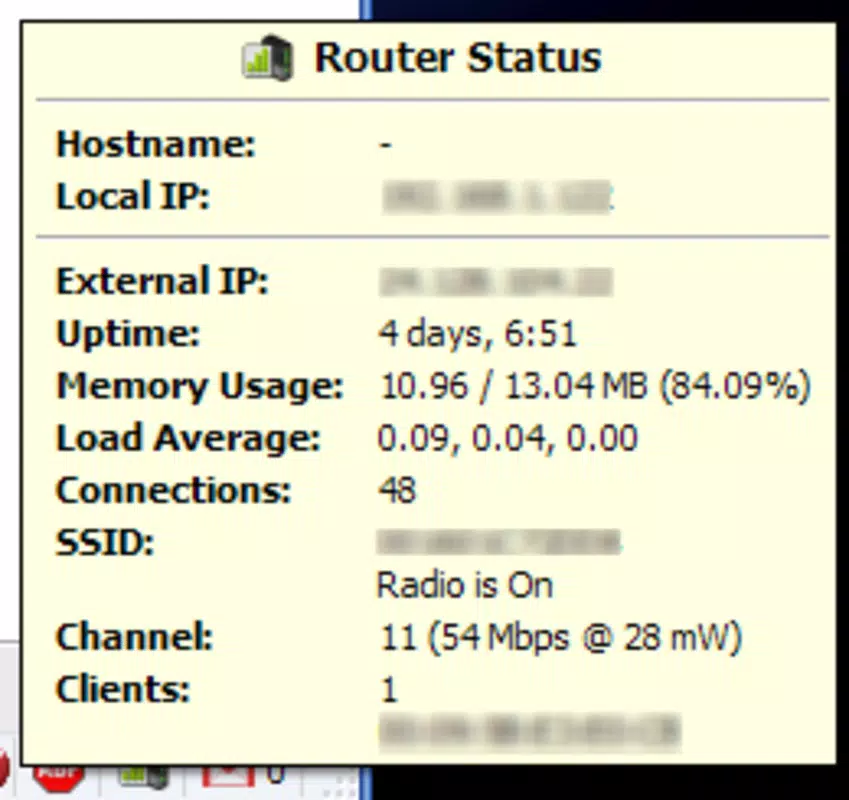
- Real-Time Status Display: The extension shows key router metrics—such as connection status, uptime, and active devices—in a compact, non-intrusive format at the lower-right corner of the Firefox window. This allows users to monitor their network without switching tabs or opening a new browser window.
- Brand Compatibility: Router Status is compatible with widely used router brands including Linksys, Netgear, and D-Link. This compatibility ensures that a significant portion of Firefox users can benefit from the tool without needing to verify device-specific support.
- Quick Access to Network Health: Users can instantly check if their router is online, whether the internet connection is active, and if any devices are currently connected. This is particularly helpful during troubleshooting sessions or when diagnosing intermittent connectivity problems.
- Minimal User Interface: The interface is intentionally simple, focusing only on essential data. There are no complex menus or settings, making it accessible even to users with limited technical experience.
- Zero Cost of Entry: The extension is entirely free to install and use, with no in-app purchases, ads, or subscription requirements. This makes it an inclusive tool for users across different economic backgrounds.
For example, a remote worker might use Router Status to confirm their internet connection is stable before joining a video call. A parent could check the extension to see if a child’s device is still connected to the network after hours. These real-world scenarios highlight how the tool enhances daily digital experiences through subtle but meaningful functionality.
Interface, UX & Performance
The user interface of Router Status is designed with simplicity and efficiency in mind. It presents a small, unobtrusive panel in the lower-right corner of the Firefox browser window, ensuring it does not interfere with browsing activities. The visual style is minimalistic, using clear text and basic icons to convey network status, with no distracting animations or complex graphics.
Navigating the extension requires no setup or configuration. Once installed, it begins displaying data immediately, assuming the router is accessible via the default gateway. The interaction is passive—users simply glance at the panel to get the latest status. This design philosophy supports a frictionless user experience, especially for those who prefer tools that work without requiring attention or input.
Although the developer did not list formal performance metrics, the extension’s file size of 156 KB suggests it is lightweight and optimized for minimal resource usage. It is expected to run smoothly on a wide range of devices, including older or low-spec systems. Responsiveness is likely to be high, given its passive monitoring approach and lack of background processes. Stability is also presumed to be strong, considering the extension’s long-standing presence since 2009 with no reported widespread issues.
Platform Compatibility & Technical Requirements
Router Status is specifically designed for the Firefox browser, making it compatible with any device that supports Firefox, including desktop computers running Windows, macOS, and Linux. The extension is available in version 1.0.1 and has a file size of 156 KB, indicating a compact and efficient footprint.
The developer did not specify minimum OS requirements or exact Firefox version compatibility. However, given the extension’s release date of 2009 and continued availability, it is likely compatible with current and recent versions of Firefox. Users should ensure their Firefox browser is up to date to maintain optimal functionality and security. Compatibility with mobile Firefox versions was not disclosed, so the app is presumed to be desktop-only.
Pros and Cons
Pros
- Lightweight design with minimal resource consumption
- Easy to install and use with no setup required
- Provides immediate access to critical network information
- Supports popular router brands including Linksys, Netgear, and D-Link
- Completely free with no ads or in-app purchases
Cons
- Compatibility with non-standard or lesser-known router brands is not confirmed
- Does not offer advanced diagnostics or historical data tracking
- Available only for Firefox, not other browsers or platforms
- Developer did not provide detailed technical specifications
- Long release date suggests limited recent updates
FAQ
Is Router Status safe to install?
Yes, the extension is free from known malware and is published by a verified developer. It does not require excessive permissions and operates within Firefox’s security framework.
Can I use Router Status on mobile devices?
The developer did not disclose mobile compatibility. Based on available information, the extension is intended for desktop use with Firefox on Windows, macOS, and Linux.
Does Router Status require a login or account?
No, the extension does not require any user account or login. It accesses router status through the local network without storing personal data.
How often does Router Status update the network status?
The update frequency is not specified. However, it likely refreshes data periodically to reflect real-time changes in network connectivity.
Is Router Status compatible with all routers?
It supports well-known brands like Linksys, Netgear, and D-Link. Compatibility with other models is not confirmed and may vary depending on the router’s web interface.
Final Thoughts
Router Status remains a reliable and practical tool for Firefox users who want a simple way to monitor their network health. Its minimal design, compatibility with major router brands, and zero cost make it a standout choice in the productivity category. While it lacks advanced features and recent updates, its core functionality continues to serve users who value speed, simplicity, and accessibility. For anyone managing a home or small office network, this extension offers a seamless way to stay informed about internet status without complexity.
Download Router Status now


